
Why Clear your Cache? Because it gets corrupted. And when it gets Corrupted, it can cause your game to crash.
What is the Cache? It's where the game stores an index of your CC content.
How do I clear the Cache?
The easiest way to deal with this - is to delete your cache files, forcing the game to recreate them each time.
Location: My Documents\EA Games\The Sims 2\
You'll find 1 or 2 files: Groups.cache and Accessories.cache.
Delete them.
Alternatively - if you can get an empty Groups.cache that if you set it to read-only, you will never have this problem again.
An empty Accessories.cache has been attached. Set it to read-only (using right-click properties in Windows Explorer)
What is the Cache? It's where the game stores an index of your CC content.
How do I clear the Cache?
The easiest way to deal with this - is to delete your cache files, forcing the game to recreate them each time.
Location: My Documents\EA Games\The Sims 2\
You'll find 1 or 2 files: Groups.cache and Accessories.cache.
Delete them.
Alternatively - if you can get an empty Groups.cache that if you set it to read-only, you will never have this problem again.
An empty Accessories.cache has been attached. Set it to read-only (using right-click properties in Windows Explorer)
Screenshots
There are no additional images for this resource
Download link
Filesize 187 bytes |
File Name Accessory.zip | # of Downloads 4,347
Comments

#3
25-06-2012

No worries Lee. I used to have a bat file that did this automagically and then started up the game. Can't find it now, and am too lazy to recreate it.
I'm happy to delete most things in test hoods, so if there's ever anything you want to check - let me know
I'm happy to delete most things in test hoods, so if there's ever anything you want to check - let me know
#4
25-06-2012

I use to clear my caches before starting my game, then about 18 months ago someone recommended I download the empty Groups.cache, I just wish I could get an empty Accessories.cache as well, then I would never have to touch that either.
Is it possible to remove the downloads folder, clear both caches, start the game then set then both to read only?
Also Kiri do you know if deleting the Content Registry does anything.
Is it possible to remove the downloads folder, clear both caches, start the game then set then both to read only?
Also Kiri do you know if deleting the Content Registry does anything.
#5
25-06-2012
The simplest way to do that - is just start up a new game. Rename your old game to 'Sims 2 - X' or something like that. The game will regenerate the cache, and they will be empty of User CC. Set them to read-only should be done.
I just had a bit of look at the content registry file that I have. It contains the links to the bodyshop files that we've added in SavedSims. I suspect that it is ok to delete. I have deleted it, and it doesn't seem to have made a difference.
Attached is an empty Accessory.cache
I just had a bit of look at the content registry file that I have. It contains the links to the bodyshop files that we've added in SavedSims. I suspect that it is ok to delete. I have deleted it, and it doesn't seem to have made a difference.
Attached is an empty Accessory.cache
#6
26-06-2012
♥ Thanks and hugs for the Accessory.cache file Kiri. ♥
If anyone wants a Groups.cache file, that is totally empty you can get one from Caleb_71 HERE, it's the one I have been using for over 12 months now without deleting.
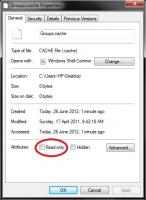
Just remember, after placing the file in My Documents > EA Games > The Sims 2...to right click, go to properties and tick the Read-only box before starting up your game.
If anyone wants a Groups.cache file, that is totally empty you can get one from Caleb_71 HERE, it's the one I have been using for over 12 months now without deleting.
Just remember, after placing the file in My Documents > EA Games > The Sims 2...to right click, go to properties and tick the Read-only box before starting up your game.
#7
18-01-2014

I just found this - and THANK YOU!!! I've been deleting them both before starting every time too (I have a one-click short cut on my desktop that takes me straight there) Now I don't have to worry about it anymore! And, my desktop is one icon cleaner YAY!
YAY!
#8
19-10-2016

I have a weird issue with the accessory.cache file: even though it's set to read-only, now and then I notice that the file has gotten bigger and the option "read-only" isn't ticked anymore. So basically I end having to replace the file with the empty one quite frequently, which is really silly xD
I never had this problem with the Groups.cache file, I set to be read-only and it stayed that way till today. Any idea what could be causing this? I have the Sims 2 Ultimate Edition and my OS is Windows 8.1
I never had this problem with the Groups.cache file, I set to be read-only and it stayed that way till today. Any idea what could be causing this? I have the Sims 2 Ultimate Edition and my OS is Windows 8.1
#9
07-09-2017

I'm having a similar issue.
I tried doing the simple way of downloading ... deleted the file, put in the 1 kb Accessory.cache file. For some reason, I can't even get it in there that way. After years of CC, I know how to put in files! So I manually did it. Deleted the old file, put in the new one, made read-only.
However, though I see the 1 kb file when I look at the file after playing, if I do a search for the accessory.cache, I get the original file, which, by the way, overrode my read-only. I tired CC-cleaning, deleting the file again, putting in the new file, making THAT read-only. It's as if the game is paying some sort of lip service, but intends to bloat the file all along, and I just can't delete it properly.
This has worked very well for some time. I have no idea why it's refusing to now. I did delete Neighborhood.manager several days ago because I was having some problems (mod conflict, and I had to go back to a backup of a hood because I believe the two battling mods did something to my game), but I don't THINK that did it. This apparently happened very early in this morning. I did nothing to cause this ... no file alterations or anything.
I'm about to go to a couple of backups and see if this has been a problem in the past. Like Lombus, my 0 KB groups.cache file APPEARS to be OK. It did get knocked out of whack some time ago when I had to replace a hood, but seems to be holding now.
OS is Win 7. I have all disks.
EDIT ... I did get it to work, but it felt like sacrificing a young gerbits.
I deleted the accessory.cache file. Let the game run, but did not go into any hoods. Exited. Of course, it generated a large file. Deleted THAT accessory.cache file. Did a CC Clean. Did a search to make sure that file was gone. Put in the new file manually, made read-only. Did a search to make sure it was 1 kb. Ran the game again without going into a hood. Exited. Went back into the files. Did a search to make sure the accessory.cache file stayed at 1 KB. This time, it did. For now.
I do find that sometimes, things can happen that can jostle both the groups.cache files and the accessory.cache files, even if they're read-only. It happens rarely, but it does happen. I am not technical-minded enough to figure out just what can jostle them, but they could involve instances when you make major changes to the game or hood. This is only speculation, however, and pretty vague speculation at that.
And perhaps sometimes, an accessory.cache file can be stubborn. I'm glad to see I'm not the only one.
I tried doing the simple way of downloading ... deleted the file, put in the 1 kb Accessory.cache file. For some reason, I can't even get it in there that way. After years of CC, I know how to put in files! So I manually did it. Deleted the old file, put in the new one, made read-only.
However, though I see the 1 kb file when I look at the file after playing, if I do a search for the accessory.cache, I get the original file, which, by the way, overrode my read-only. I tired CC-cleaning, deleting the file again, putting in the new file, making THAT read-only. It's as if the game is paying some sort of lip service, but intends to bloat the file all along, and I just can't delete it properly.
This has worked very well for some time. I have no idea why it's refusing to now. I did delete Neighborhood.manager several days ago because I was having some problems (mod conflict, and I had to go back to a backup of a hood because I believe the two battling mods did something to my game), but I don't THINK that did it. This apparently happened very early in this morning. I did nothing to cause this ... no file alterations or anything.
I'm about to go to a couple of backups and see if this has been a problem in the past. Like Lombus, my 0 KB groups.cache file APPEARS to be OK. It did get knocked out of whack some time ago when I had to replace a hood, but seems to be holding now.
OS is Win 7. I have all disks.
EDIT ... I did get it to work, but it felt like sacrificing a young gerbits.
I deleted the accessory.cache file. Let the game run, but did not go into any hoods. Exited. Of course, it generated a large file. Deleted THAT accessory.cache file. Did a CC Clean. Did a search to make sure that file was gone. Put in the new file manually, made read-only. Did a search to make sure it was 1 kb. Ran the game again without going into a hood. Exited. Went back into the files. Did a search to make sure the accessory.cache file stayed at 1 KB. This time, it did. For now.
I do find that sometimes, things can happen that can jostle both the groups.cache files and the accessory.cache files, even if they're read-only. It happens rarely, but it does happen. I am not technical-minded enough to figure out just what can jostle them, but they could involve instances when you make major changes to the game or hood. This is only speculation, however, and pretty vague speculation at that.
And perhaps sometimes, an accessory.cache file can be stubborn. I'm glad to see I'm not the only one.
(This post was last modified: 07-09-2017 12:54 AM by gazania.)


